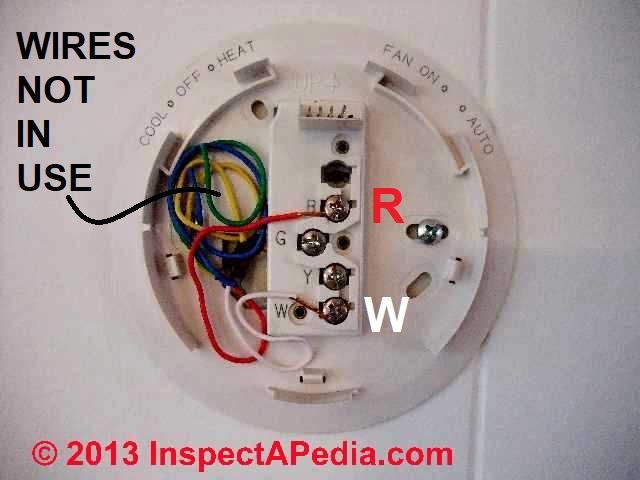
 How Wire an American Standard Thermostat

- POST a QUESTION or COMMENT about heating, air conditioning, and heat pump thermostat installation and wiring
Thermostat wiring details & connections for American Standard thermostats. This article gives a table showing the proper wire connections for the American Standard room thermostat used to control heating or air conditioning equipment.
These connections also work for most GE (General Electric and Trane) thermostats.
Room thermostat installation & wiring guide: this article series explains the basics of wiring connections at the thermostat for heating, heat pump, or air conditioning systems.
Our page top sketch, courtesy of Honeywell Controls, illustrates the wiring diagram for a traditional Honeywell T87F thermostat used for 2-wire single pole single throw control of heating only in a typical gas-fired heating system.
InspectAPedia tolerates no conflicts of interest. We have no relationship with advertisers, products, or services discussed at this website.
- Daniel Friedman, Publisher/Editor/Author - See WHO ARE WE?
American Standard, GE & Trane Thermostat Wiring Guide
How to Wire a General Electric (GE), Trane, American Standard HVAC Thermostat |
||
| Numbers | Refer to the equipment wiring diagram (usually glued inside the equipment access covers and in the the installation/service manual). May be stages of electric heat, especially on Air-Pro, Borg Warner, Coleman-Evcon, Frasier Johnson |
|
| Blue, Brown, Tan, or Gray | Service indicator lamp | |
| Pink or other color | Second stage of heat (may be same as (W) on heat pump or oil/gas systems. | |
| Second stage of electric heat on GE/Trane/American Standard systems. Also used as indicator lamp or misc. contact on other systems. | ||
| Blue, Pink | Compressor second stage | |
We provide thermostat wiring connections for just about every type of residential heating or cooling room thermostat as well as a description of thermostat wiring color codes & conventions.
How do I figure out which of 8 thermostat terminals get connected to my 2-wire thermostat
I need to know If the 2 wire thermostat will work doing this and which of the 8 terminals I need to use.
We bought a 2 wire thermostat and used the terminals on the unit labeled red and white which is what is marked on the thermostat. but it would not come on. On 2019-03-04 by ken
by mod
I'm stuck partly because I'm not sure exactly what your equipment and wiring are doing. I think what you might do is work backwards from your heating system.
You should have to thermostat wires connected to the thermostat connections at your heater that will call for heat if you simply connect or jumper those two terminals the heat turn on if it doesn't then you've got the wrong terminals at the heater or something is broken.
If he does turn on by jumping the thermostat terminals at the heater and you know that you just need those two wires brought to a thermostat that it's needed to act as a simple on-off switch.
by ken
You are saying just jumper 2 terminals at a time together and see if any of them turn on the heat. If so then those are the 2 that need connected to the thermostat.
Reply by (mod) -
Disconnect wires AT THE HEATER
and then see if connecting the two T T terminals there cause the heater to run. Then you'll understand where you are.
Watch out: when we're not familiar with electrical wiring it's safest to get on-site help - making a mistake could become a disaster and with heating systems risks fire, shock, or worse.by ken
Are you saying to disconnect the heating element and then jumper 2 of the termiinals together and reconnect the heating element to see if that works and do this until you get the correc2 terminals?
by (mod) - ok here wego in more detail:
How to Debug a Thermostat by First Eliminating the Thermostat and its Wires from Heater (or A/C) Operation
NO Ken I was saying that you can simplify the diagnosis of a thermostat wiring problem by eliminating the thermostat and all of its wiring from the equation.
- Go to the heating equipment primary control
- Find the place on that control where the thermostat wires connect - normally marked T1 and T2 or just T and T.
- Disconnect the thermostat wires from the control
- Now, remembering that the thermostat is nothing but a low-voltate-operated On-Off switch that turns the control on or off on a call for heat (or cooling), just jumper the two T - T terminals on the control.
- Watch what happens. Does the heater or A/C run properly?
That's exactly the same effect you'd see IF the Thermostat on the wall in the occupied space were calling for heat.
Now
IF the heater runs normally (or on a hot water heating system the zone valve operates)
THEN we know that the problem is at the thermostat or in the wires between the thermostat and the control
OK to use the inside unit from an American standard system as a furnace to heat my garage?
Can I use the inside unit from an American standard system as a furnace to heat my garage? If so how many wire thermostat do I use and how do I connect in the unit.
This is the air handler I suppose from an electric system Model #TWV025B14oA1. In other words I guess what I am saying is I do not have the outside unit. just the air handler with the auxillary heat in it. On 2019-03-03 by ken
Reply by (mod) -
You'll be heating in the more-expensive electric backup heat mode but it's possible.
Changing between an American Standard thermosta and a Honeywell FocusPro 6000 I have an extra wire to connect
I have swapped the residences of a Honeywell FocusPro 6000 series thermostat (TH6220D) and an American Standard ACONT802AS32DA thermostat.
When swapping the FocusPro 6000 to where the ACONT802 was I found the ACONT802 had an extra wire connected to the X2 pin... does this connect to the remaining pin on the FocusPro at the "L" terminal? What is this wire for? Can it be left unused?
The FocusPro 6000 also has an "E" terminal.
Thanks- Tom On 2016-02-21 by TomReply by (mod) -
Tom: Check the wiring diagrams in your installation instructions sheet for the American Standard ACONT802 thermostat. You'll see that there are different terminal identifications for different applications such as Heat/Cool, Heat Pump.
For EXAMPLE (this may not be your system), X2 is actively used in a single stage heat pump with an aux backup heat source and connects on the board to W2, or with a multi-stage, to W3 - relays for backup heat.
I lost the 24VAC power to my thermostat
Lost 24vac to thermostat. System is American Standard heat pump, Heritage 11, manufactured Sept, 2000.
Is there a fuse or a reset button that's not shown on the schematic On 2015-08-30 by Robert
Reply by (mod) -
If there is no power to the thermostat check for 24VAC at the transformer that powers it - usually located in or near your inside air handler; if there is power there then the TT wires are perhaps disconnected or broken.
Also because I sometimes find that even after working for a time a thermostat, particulary a smart thermostat that uses more power, can seem to die or go blank for loss of power, a problem that we fix by this upgrade on how to
ADD a COMMON WIRE at THERMOSTATS
How do I hook up the wires when Replacing a round Honeywell T87 with a Digital Honeywell Thermostat
Hello - I am replacing a round Honeywell thermostat with a non-programmable digital Honeywell unit. I have a hot water system with multiple zones and with no air conditioning.
There are three wires at the thermostat. On the old round unit the red wire went to the R terminal, the white wire went to the w terminal and a green wire went to B terminal. I hooked up the new stat the same way but it would not work.
If I selected "fan on" instead of "fan auto" the zone would heat up but would not shut off (hot water kept flowing even if I selected a temp below room temp). Appreciate your help. - Patrick - 1/20/12
Reply:
Patrick, typically the three wire thermostat hookups would be exactly the same for the old and new thermostats.
For details of wiring a typical and simple digital Honeywell thermostat,
see Honeywell 5-2 Day Programmable Thermostat - RTH2300B1012.
For help in understanding the wiring of your old thermostat,
see Three-Wire Honeywell Wall T87-F type Thermostat wiring and also
What are the wire connections if I am replacing a mercury thermostat with a digital unit?
I am replacing an old mercury thermostat with a digital. my system is a heat pump. my neighbor gave me the digital, no instructions, no box.
Ii'm trying to decide if this is even a heat pump compatible thermostat. on the therm it has
c, g, rc, rh (which are linked by a black wire.)
w, y, b, and o. coming out of my wall is, white connected on old therm w2, yellow connected to y, green conn g, black conn e, red to r, blue to b and bro to x. any help would be great. - Kurt 6/4/12
Reply:
Kurt, as you see in the examples at For help in understanding the wiring of your old thermostat,
see Three-Wire Honeywell Wall T87-F type Thermostat wiring and also
see Generic HVAC Thermostat Control Wiring Points. Many thermostat wiring setups are straightforward or "cookbook" but why not find the brand name on your thermostat and then you can obtain the installation instructions right from the manufacturer?
Also, Honeywell's thermostat replacement advice (and most likely that of all thermostat manufacturers) warns:
Watch out: MERCURY NOTICE: Do not put your old thermostat in the trash if it contains mercury in a sealed tube.
Contact your local waste management authority for instructions regarding recycling and proper disposal.[5]
...
Continue reading at THERMOSTAT INSTALLATION STEPS or select a topic from the closely-related articles below, or see the complete ARTICLE INDEX.
Or see these
Recommended Articles
- AMERICAN STANDARD AGE MANUALS & PARTS GUIDES - heating equipment
- AMERICAN / AMERICAN STANDARD WATER HEATER AGE & MANUALS - water heaters
- AMERICAN STANDARD THERMOSTAT WIRING - thermostats
- THERMOSTAT WIRE TERMINAL ID CODES / FUNCTIONS
- THERMOSTAT WIRING COLOR CODES
Suggested citation for this web page
THERMOSTAT WIRING AMERICAN STANDARD at InspectApedia.com - online encyclopedia of building & environmental inspection, testing, diagnosis, repair, & problem prevention advice.
Or see this
INDEX to RELATED ARTICLES: ARTICLE INDEX to HVAC THERMOSTATS
Or use the SEARCH BOX found below to Ask a Question or Search InspectApedia
Ask a Question or Search InspectApedia
Share this article:Questions & answers or comments about heating, air conditioning, and heat pump thermostat installation and wiring
Search the InspectApedia website
Need to make a private comment? Email editor@inspectApedia.com. We welcome email with your website content critique, corrections, suggestions or questions. Email is monitored daily but our workload may prevent an immediate reply. For immediate results, we hope you'll first try asking your question using the search box just above.
Citations & Reviewers
In addition to any citations in the article above, a full list is available on request.
- [2] Thanks to reader S.R. for discussing loss of heat due to a thermostat wiring mistake, October 2010
- [3] Thank to Mr. Scott Meenen , G&S Mechanical Services , for providing some common thermostat wiring codes also found at Mr. Meenen's web page Malware Deleted 12/9/2014 . Mr. Meenan provides heating, heat pump, and air conditioning repair services in Maryland, Washington D.C., and northern Virginia. He can be contacted at 301-591-1646 or by Email to Malware Deleted 12/9/2014 - 10/2010. Quoting:
- [8] "Automatic Oil Burner Controls - Thermostats", Domestic and Commercial Oil Burners, 3rd Ed., Charles H. Burkhardt, McGraw Hill, 1969 (and later editions), ASIN B0000EG4Y8
- [9] Thermostat wiring color codes & conventions, Thanks to reader " Helpful Pointers" Regarding 24V T, 10/7/2012
- [10] Domestic Central Heating Wiring Systems and Controls, 2d Ed., Raymond Ward, Newnes, ISBN-10: 0750664363, ISBN-13: 978-0750664363, Quoting from Amazon.com:
- [11] Proliphix Corporate Headquarters [Website: proliphix.com] , 3 LAN Drive Suite #100, Westford, MA 01886 Phone: +1.978.692.3375 Toll Free (U.S.): 866-IP-LIVING (866.475.4846) Fax: +1.978.692.3378 - Sales: sales@proliphix.com Marketing: marketing@proliphix.com Customer support: support@proliphix.com http://www.proliphix.com/ - quoting from the company's website:
- [12] "Heating Control Handbook for the Installer and Service Man,Oil Burner, Gas Burner and Stoker Controls", Honeywell Corporation, March 1949 [copy on file as HoneywellControlsHandbookSA1399-2-1949.pdf] .
- In addition to citations & references found in this article, see the research citations given at the end of the related articles found at our suggested
CONTINUE READING or RECOMMENDED ARTICLES.
- Carson, Dunlop & Associates Ltd., 120 Carlton Street Suite 407, Toronto ON M5A 4K2. Tel: (416) 964-9415 1-800-268-7070 Email: info@carsondunlop.com. Alan Carson is a past president of ASHI, the American Society of Home Inspectors.
Thanks to Alan Carson and Bob Dunlop, for permission for InspectAPedia to use text excerpts from The HOME REFERENCE BOOK - the Encyclopedia of Homes and to use illustrations from The ILLUSTRATED HOME .
Carson Dunlop Associates provides extensive home inspection education and report writing material. In gratitude we provide links to tsome Carson Dunlop Associates products and services.
 |
HOME | ABOUT | ASK a QUESTION | CONTACT | CONTENT USE POLICY | DESCRIPTION | POLICIES | PRIVACY | |
| © 2026 - 1985 Publisher InspectApedia.com - Daniel Friedman | |||||||||